
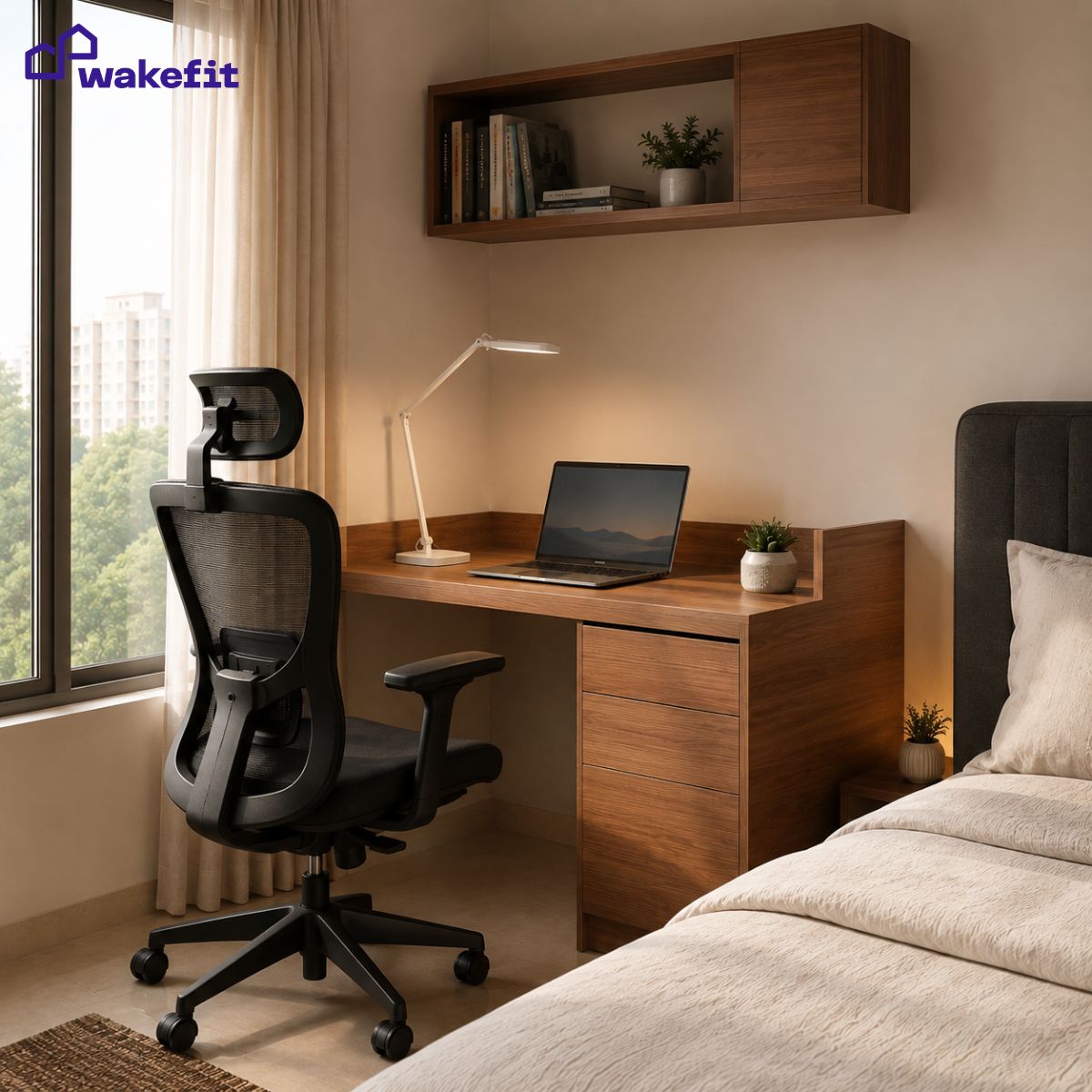

Working from home changed how Indians use their apartments. What used to be a study corner or a dining table now has to function as a real office for 8 to 10 hours a day. The problem is that most Indian 2BHK apartments were not designed with a dedicated workspace in mind. The average Indian bedroom is 120 to 140 sq ft. After the bed and wardrobe, you have roughly 30 to 40 sq ft left – just enough for a study table, a chair, and a lamp, if you choose each one deliberately.
This guide covers the furniture, placement, lighting, and setup choices that make a small workspace genuinely comfortable to work in for a full day.
How much space do you actually need to set up a functional workspace at home?
Less than most people think – but slightly more than most people allow for.
The minimum viable workspace requires three things: a surface to work on, a chair that supports your posture, and a light source. The footprint of a compact study table (100 cm wide, 50 cm deep) plus an office chair pulled out to working position is approximately 100 x 100 cm – a one-square-metre zone. Most Indian bedrooms have this available somewhere, even if it does not feel obvious at first.
The reason workspaces feel cramped is usually not that there is too little floor space – it is that the space chosen is the wrong shape, or the furniture chosen is the wrong size. A 150 cm wide dining table repurposed as a desk takes up three times the footprint of a compact study table and still provides less usable workspace because it has no integrated storage, no cable management, and no defined edges that signal “this is the work zone.”
| Workspace Size | What Fits | Suitable For |
|---|---|---|
| Very compact (under 90 cm wide) | Laptop only, one monitor maximum, phone stand | Part-time remote work, students |
| Standard (100-120 cm wide) | Laptop + external monitor, small shelf, desk organiser | Full-time WFH, most home office setups |
| Comfortable (120-150 cm wide) | Dual monitor, full keyboard + mouse, document tray, lamp | Design, editing, heavy documentation work |
| Extended (150+ cm wide) | Everything above plus space for physical files, books, or a second seat | Home-based businesses, frequent video calls |
For a standard Indian WFH setup with a laptop and one monitor, 100 to 120 cm width is the right target. Going smaller means constant shuffling of items. Going larger in a small room means the desk dominates and the rest of the room suffers.
What should you look for in a study table with storage for a small room?
Storage is the feature that separates a study table that works in a small room from one that creates clutter the moment you sit down. Without integrated storage, everything that would normally go in a drawer – chargers, stationery, notebooks, cables – ends up on the desk surface, reducing your actual working area and making the setup look disorganised.
The storage features that matter most in a compact setup:
- At least one drawer: Even a single shallow drawer removes 80 per cent of the desk clutter in most Indian setups. Stationery, chargers, headphones, and miscellaneous items that end up on the surface all find a home here.
- An upper shelf or hutch: A shelf above the desk surface – at around 45 to 50 cm height from the tabletop – provides storage that does not eat into your working area. Books, a study lamp, and a router can all live here rather than on the desk.
- Cable management cutout or tray: A hole in the desk surface or a rear cable tray keeps power cables and charging cables from pooling on the tabletop or hanging over the edge to the floor.
- Side storage tower: Some study tables with storage include a narrow vertical cabinet on one side – 30 to 40 cm wide, 120 to 150 cm tall. This provides significant storage in a small footprint and can serve as a room divider between the workspace and the rest of the room.
A study table with integrated storage also anchors the workspace visually. In a bedroom that doubles as an office, the storage unit signals where the work zone ends – which matters psychologically when you are trying to mentally leave work at the end of the day.
Does an ergonomic office chair matter if you only work for a few hours a day?
Yes – and the threshold is lower than most people realise. Posture-related discomfort begins to accumulate after about 45 minutes in a chair that does not support the lower back correctly. Most people who say they only work “a few hours” are actually working three to five hours at the desk, which is long enough for a non-ergonomic chair to cause neck strain, lower back pain, and fatigue that outlasts the work session.
The specific features that matter for Indian home setups:
- Lumbar support: The chair’s backrest should support the natural inward curve of the lower back. Without this, you lean forward or slump backward – both cause cumulative strain over hours of sitting.
- Adjustable seat height: Your feet should rest flat on the floor with thighs parallel to the ground. Most Indian dining chairs and regular chairs are too high for shorter users. An adjustable-height office chair solves this without requiring a footrest.
- Armrests: Armrests that position your elbows at 90 degrees keep your shoulders from hunching upward toward your ears – the position that causes trapezius pain after long sessions.
- Breathable mesh back: Indian summer temperatures make a foam-padded back chair uncomfortable within an hour. A mesh back allows air circulation and is significantly more comfortable in warm rooms without air conditioning.
If you are experiencing any back pain during or after work sessions, the chair is almost always the cause – or a contributing factor. An ergonomic office chair is the single highest-ROI investment in a home workspace. It costs more than a regular chair upfront but prevents far more expensive downstream problems. We have covered what to look for in an office chair specifically for back pain in detail if this is a concern.
Where should you place a desk in a small room for the best setup?
Placement determines how much natural light you get, how the room feels after the desk is in it, and how usable the remaining space is. Three placement options work in most Indian small rooms, each with different tradeoffs.
Against the wall, facing the wall: The most space-efficient option. The desk footprint intrudes minimally into the room because you sit with your back to the room. Works well in bedrooms where floor space is tight. The downside is that staring at a wall for hours can feel oppressive – mitigate this with a small pin board, a plant on the shelf above, or artwork at eye level.
Against the wall, facing the room: You face outward into the room while working, which feels more open. This requires pulling the chair back into the room when seated, which needs about 60 to 70 cm of clear floor in front of the desk. Good for video calls because your background is the room rather than a wall directly behind you.
In the corner (L-shaped or corner desk): Maximises usable surface area while minimising floor footprint. An L-shaped corner desk that uses a 90-degree corner gives you roughly double the working surface of a straight desk for almost the same floor space. The downside: corner setups are harder to move if the room layout needs to change.
The window rule: Regardless of which wall the desk is against, never place the desk with a window directly behind your monitor. The backlight creates screen glare and eye strain within minutes. The ideal position is window to the left or right of the desk – natural light falls on your work surface from the side rather than from behind or in front of the screen.
What kind of study lamp do you actually need for a home workspace?
Lighting is the most overlooked part of a home workspace setup and the one most directly connected to how tired your eyes feel after a work session. Most Indian rooms rely on a single overhead light – a tube light or a ceiling LED panel. This creates flat, even illumination with no directional quality. For a workspace, you need a directed light source that illuminates the work surface specifically.
The specifications that matter when choosing a study lamp:
- Colour temperature: For focus and alertness during work, choose a lamp with a colour temperature between 4,000 and 5,000 Kelvin (cool white or neutral white). Warm white bulbs (2,700 to 3,000 K) are relaxing for evenings but reduce alertness during work. Avoid anything marketed as “daylight” above 6,000 K – it can cause eye strain after extended use.
- Brightness (lumens): A desk lamp for primary task lighting should output at least 450 lumens. Most LED desk lamps rated at 5 to 9 watts deliver this. Dimmer lamps work as ambient accent light but are not bright enough for reading documents or looking at physical work.
- Adjustable arm and head: A lamp you can reposition – left, right, closer, further – lets you eliminate shadows regardless of where documents or notebooks are on the desk. Fixed-position lamps create permanent shadows in one part of the desk surface.
- Eye care certification: Some study lamps are certified for flicker-free output and low blue light emission. For long work sessions (6+ hours), these certifications matter. Flickering light – even below the threshold of visible perception – causes cumulative fatigue over hours.
Placement rule: the lamp should be to the non-dominant side. Right-handed workers place the lamp to the left so the hand does not cast a shadow on the writing surface. Left-handed workers do the opposite.
How do you manage cables at a desk in a small workspace?
A desk with four visible cables – laptop charger, monitor cable, keyboard, mouse – feels cluttered and disorganised even if the desk surface itself is clear. Cable management at the desk level is faster to solve than cable management behind a TV unit because the runs are shorter.
Step 1: Go wireless where possible. A wireless keyboard and mouse eliminate two cables entirely. These cost Rs. 800 to 2,000 for a reliable combo set and have essentially zero downside for standard WFH work. This is the highest-impact cable reduction available.
Step 2: Use a USB hub or charging station on the desk. Instead of separate chargers for phone, headphones, and other devices, a single multi-port USB hub means one cable from the hub to the laptop and all other devices charged from the hub. This reduces four to five cables to one.
Step 3: Route the remaining cables through the desk’s cable cutout or tray. If the study table has a cable management hole, route the monitor cable and laptop charger through it so they drop straight to the power strip below rather than lying across the desk surface. The power strip should sit on the floor directly below the desk, or in a cable management box fixed to the underside of the desk.
Step 4: Use a cable spine along the desk leg. Any cable that runs from the desk surface to the floor should be bundled into a single cable spine – a flexible plastic channel that holds all floor-bound cables in one vertical run rather than individual cables dangling. These are available in India for under Rs. 200 and reduce the visual chaos of floor-level cables to a single clean line.
How do you create a visual boundary between your workspace and bedroom?
This is a question that rarely gets asked about workspace setup, but it is one of the most important for people who struggle to mentally switch off after work. When the desk is visible from the bed, the workspace and the sleep space occupy the same visual field. This keeps the brain in a mild state of work-readiness even when you are trying to rest.
Three solutions that work in Indian bedrooms without structural changes:
A room divider or bookshelf behind or beside the desk: A tall bookshelf (150 to 180 cm, two to three shelves) placed perpendicular to the wall – rather than against it – creates a partial visual divide between the workspace and the rest of the bedroom. Books, plants, and decor on the shelf face into the room; the desk is behind it. From the bed, you no longer have a direct sight line to the work surface.
A curtain panel: A ceiling-to-floor curtain on a tension rod can be drawn across the workspace area at the end of the workday. The desk and monitor are completely out of sight within 10 seconds. This is the most effective separation method for people who have tried other approaches and found them insufficient.
Consistent lighting zones: Keep the desk lamp on only during work hours and off at all other times. The desk lamp defines the work zone – when it is off, the zone visually recedes. When it is on, it is clearly “work time.” This is a behavioural signal that reinforces the separation even when physical dividers are not possible.
What additional storage works well alongside a study table in a small room?
The desk and chair take the primary floor space. Any additional storage needs to be vertical – going up rather than out.
Wall-mounted floating shelves above the desk: The wall above the desk is almost always unused. Two or three floating shelves at heights of 45, 75, and 110 cm above the desk surface give you significant storage without any additional floor footprint. The lowest shelf holds frequently used books and reference materials. Higher shelves hold archived files and decor.
A narrow storage tower beside the desk: A vertical cabinet 30 to 40 cm wide and 150 cm tall provides the storage equivalent of a chest of drawers in a fraction of the floor space. In a bedroom where the wardrobe handles clothing, a narrow tower beside the desk holds work documents, office supplies, and equipment in an organised stack.
Under-desk storage: Many people do not use the space under the desk at all. A two-drawer pedestal that rolls under the desk surface – available in most office furniture ranges – provides document storage that is immediately accessible while seated and disappears completely when not in use.
If the bedroom is small enough that floor space is genuinely at a premium – say, under 100 sq ft after furniture – a bed with hydraulic storage eliminates the need for a separate wardrobe or storage chest entirely. A hydraulic storage bed gives you the equivalent of two large wardrobes in storage volume beneath the mattress. This frees up a full wall of floor space that would otherwise hold a wardrobe – often enough to fit a study table and chair in a room that previously had none.
How do you set up a workspace when there is no obvious space for one?
When the bedroom is full and the living room is shared, three unconventional placements work in Indian apartments that seem to have no space left.
The bedroom corner: Every bedroom has at least one corner that is currently empty or under-used – usually the corner diagonally opposite the door. A corner study table (L-shaped or triangular) uses this space without interrupting any of the existing furniture’s sight lines or traffic paths. Corners also feel more private than wall-facing setups, which helps with concentration.
A fold-down wall desk: A Murphy-style fold-down desk mounts to the wall and folds flat when not in use. When folded down, it provides a 90 to 100 cm wide working surface. When folded up, it is a 15 cm deep panel on the wall – effectively invisible. These are particularly well-suited for studio apartments or single rooms where floor space cannot be permanently given to a desk.
The wardrobe nook: In some Indian bedrooms, the wardrobe does not run the full length of the wall. The remaining space – sometimes as little as 80 cm wide – is typically unused. A compact study table fitted into this nook with a shelf mounted above it creates a fully enclosed workspace that feels like a study alcove, even in a standard bedroom.
The consistent principle across all of these: the right workspace in a small room is not about finding more space – it is about using the space that already exists more deliberately. Almost every Indian bedroom has enough room for a functional workspace. The difference is usually two decisions: choosing furniture sized for the actual room rather than the showroom, and placing it in a corner or against a wall that reads as “unused” rather than where the first obvious wall is.
Frequently Asked Questions
What is the minimum size study table for a small room?
A study table of 90 cm width and 45 cm depth is the minimum for a laptop-based setup with a small organiser. For a monitor + laptop setup, 100 to 120 cm width is recommended. Go below 90 cm only for very occasional or short-duration use – the surface constraint becomes frustrating quickly in full-time work.
Can I work from my bedroom without it affecting my sleep?
Yes, with two conditions: keep the desk out of direct sight from the bed (use a divider, bookshelf, or curtain), and follow a consistent end-of-work ritual that includes switching off the desk lamp and moving away from the desk. These cues signal to the brain that the work zone is closed, which makes it significantly easier to relax in the same room.
Where should a study lamp be placed on a desk?
On the non-dominant side – to the left for right-handed users, to the right for left-handed users. This positions the light so your working hand does not cast a shadow on the area you are writing or reading. Ideally, the lamp arm should extend over the work surface so light falls at a 30 to 45 degree angle onto the desk rather than directly downward.
What colour temperature bulb is best for studying and working?
4,000 to 5,000 Kelvin (cool white or neutral white) for focus and alertness during work hours. Avoid warm white (2,700 to 3,000 K) for work sessions – it is relaxing rather than stimulating and reduces alertness. Avoid very cool daylight bulbs above 6,000 K for extended sessions as they can cause eye strain.
Is an ergonomic chair necessary for a home office?
Yes for any work session of one hour or more. An ergonomic chair with lumbar support and adjustable height prevents the lower back and neck strain that accumulates in regular chairs. The cost difference between a basic chair and a proper ergonomic chair is typically Rs. 3,000 to 8,000 – far less than the physiotherapy or medical costs of chronic posture-related pain.
How do I reduce cables on my desk without buying expensive products?
Start with a wireless keyboard and mouse (under Rs. 1,000 for a reliable combo). Then use velcro cable ties (Rs. 150) to bundle the remaining cables together. Route the bundle through the desk’s cable hole if there is one, or use a cable clip strip stuck under the desk edge to keep cables off the surface. These three changes cost under Rs. 1,500 total and eliminate most visible desk clutter.
What is the right desk height for working without back pain?
The desk surface should be at elbow height when you are seated with your feet flat on the floor. For most Indian adults, this is between 70 and 75 cm. If your chair is at the right height but the desk is too high, use an adjustable desk or add a keyboard tray below the desk surface. If the desk is too low, risers under the desk legs or a monitor stand bring the screen to eye level.
What furniture should I buy first when setting up a small home office?
In order of impact: first the chair (posture affects your health from the first day), then the study table with storage (defines your working area and reduces surface clutter), then the desk lamp (lighting affects concentration and eye health from the first hour), and then any additional storage. The monitor, keyboard, and accessories come last – they do not affect comfort or health as directly as the first three items.


No Comments