
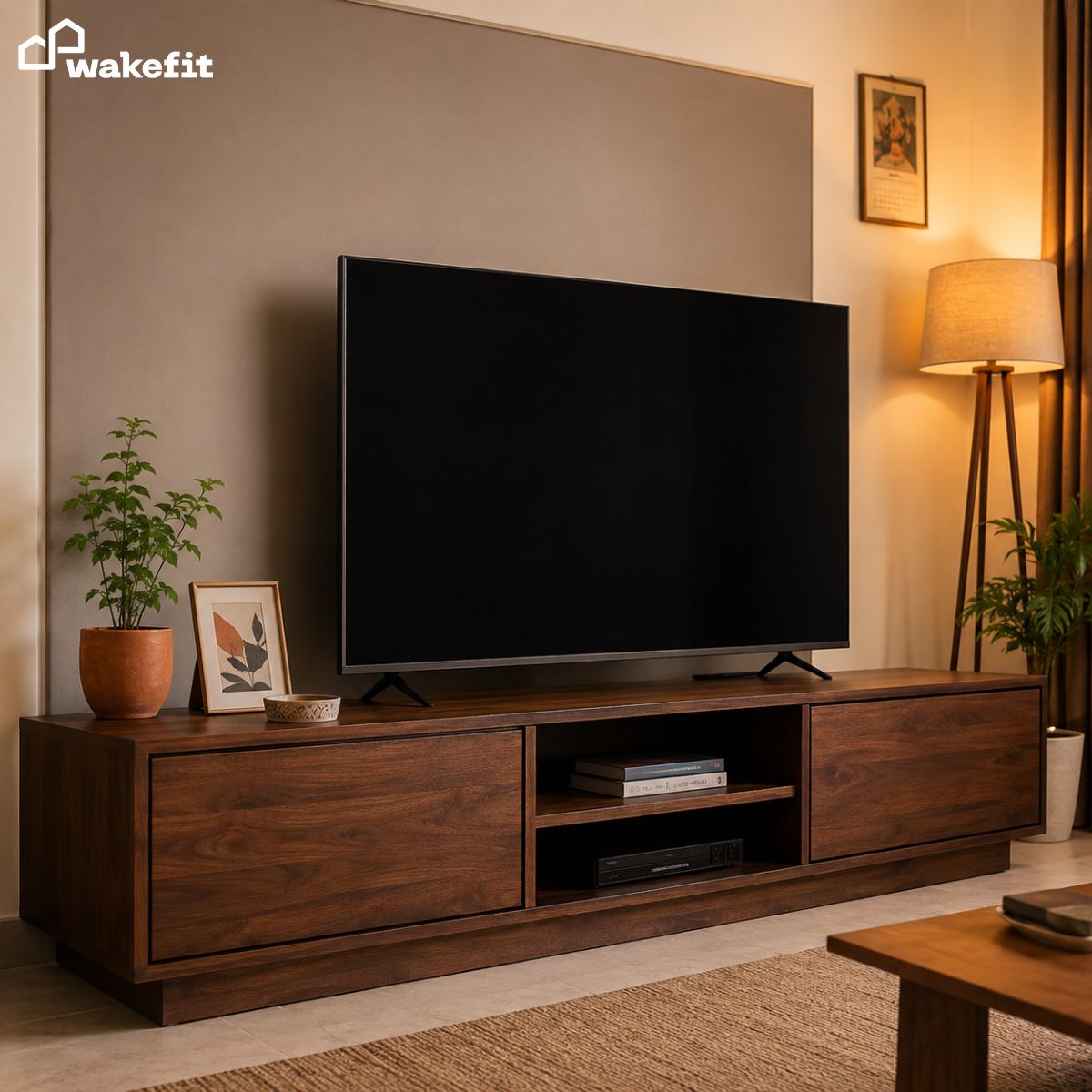

The average Indian living room has at least five wires hanging from the TV – power cable, HDMI from the set-top box, soundbar cable, router ethernet, and a charging extension. Most people leave them because they assume hiding wires requires a carpenter, a wall renovation, or expensive imported products. None of that is true. The right modern TV unit does most of the work before you add a single cable clip or management product.
This guide covers how to choose a TV unit that solves the wire problem by design, plus the practical steps to get to a genuinely clean setup.
Why do TV wires look messier in Indian homes than they need to?
Three reasons that compound each other.
First, most Indian homes still use a set-top box or DTH receiver. Unlike streaming-only setups abroad, an Indian TV installation typically has the TV, the set-top box, a router, a soundbar or speaker bar, and at least one extension board – each contributing its own cable. A Western living room with just a smart TV and a streaming stick has two wires. An Indian setup with all of the above has seven or eight.
Second, TV units in India are often bought for storage and price rather than for cable management as a feature. The result is a unit that has no back panel cutout, no internal cable channel, and nowhere to tuck the extension board. Everything ends up draped over the front edge or pooled on the floor behind.
Third, most Indian apartments have the power socket on the side wall or in a corner rather than centred behind the TV unit. This forces the power cable to run horizontally along the floor or baseboard before reaching the socket – adding visible length and a tripping hazard.
Understanding these three causes helps you fix the right thing. Most wire problems in Indian homes are a furniture problem, not a product problem.
What features should a modern TV unit have for cable management?
Not all TV units are built for clean setups. These are the features that separate a unit that manages cables from one that just hides storage.
| Feature | What to Look For | Why It Matters |
|---|---|---|
| Back panel cutouts | Round or D-shaped holes at the rear of each cabinet section | Lets cables pass from device to cable channel without routing over the top edge |
| Internal cable channel | A dedicated groove or channel running horizontally behind the unit | Keeps all cables in one route, out of sight from the front and sides |
| Enclosed base with gap | A base panel with a small floor gap (30-50 mm) rather than open legs | Hides floor-level cables and the extension board from view |
| Closed back panel option | A solid or semi-solid rear panel rather than a fully open frame | Blocks the view of cables even if they are not perfectly organised |
| Adjustable shelving | Shelves that can be repositioned to fit the set-top box and other devices | Lets you hide all devices inside the unit rather than on top of it |
If a TV unit has all five of these, your cable management is 80 per cent solved before you run a single cable. The remaining work is routing and tucking – not engineering a solution.
How does a TV unit with storage help hide wires more than an open shelf?
An open shelf TV unit – the kind that is just a horizontal slab or floating plank with no enclosed sections – gives cables nowhere to go. Every device sits in full view and every cable is exposed because there is no interior to route into.
A TV unit with storage – enclosed cabinets on either side of the main shelf, or a full floor-to-ceiling unit with doors – changes the geometry completely. Devices go inside the cabinets. Cables route from inside to inside through the back panel cutouts. The extension board lives in the bottom cabinet. What the viewer sees is a closed front panel with a TV on top. Nothing else is visible.
This is why TV units with storage are consistently better at managing cables in Indian homes than floating shelves or minimalist open units. The storage is not a bonus feature – it is the mechanism that makes the clean look possible.
The added benefit: all your OTT devices, gaming consoles, speaker amplifiers, and routers can live inside the unit entirely out of sight. Visitors see a clean TV wall. You know exactly where every device is.
Should the TV be wall-mounted or on a TV unit for cleaner cable management?
This is the most common cable management question, and the answer is: a TV unit is almost always cleaner in an Indian home.
Wall mounting looks minimal in photos but creates a practical problem: the TV wires still need to go somewhere. In a wall-mounted setup, the cables hang from the TV down to the floor or socket – visibly – unless you hire an electrician to run conduit inside the wall or use cable raceways on the wall surface. In Indian apartments, chasing cables through the wall typically requires landlord approval and creates dust and damage that needs to be made good before you leave.
A TV unit placed flat on the floor eliminates this problem entirely. The TV sits on the unit’s surface. Cables drop straight down from the TV into the unit’s interior – a vertical drop of six to eight inches – and disappear. No wall work. No conduit. No landlord conversation.
Wall mounting makes genuine sense in two situations: a permanently owned home where you can run in-wall conduit, or a very small room (under 100 sq ft) where floor space is so constrained that a floor-standing unit is impractical. For the typical rented Indian 2BHK, a well-chosen TV unit beats wall mounting on both cable management and practical flexibility.
What types of TV units work best for hiding wires in Indian living rooms?
There are four common TV unit styles available in India, each with a different cable management profile.
Console TV unit (low, horizontal, floor-standing): The most common type in Indian homes. Works well if it has enclosed cabinet sections on the sides. A pure open-shelf console with no enclosed sections manages cables poorly. Choose a console that has at least one enclosed section with a back panel cutout.
Floor-to-ceiling TV unit (full wall panel): The best for cable management in a permanent home. All devices, cables, and the extension board live inside the unit. Nothing is visible from the front. The cable route from device to power socket happens entirely behind closed doors. If you own your home or have a long-term lease, this type is worth the investment.
Floating wall-mounted TV unit: Appears clean from the front because it is off the floor. Cable management depends heavily on whether the unit has back panel cutouts. Without cutouts, cables have to drop from the unit down to the floor in full view. With cutouts and a wall-mounted power socket positioned behind the unit, it can look very clean.
Open shelf or ladder TV unit: Minimalist look, maximum cable visibility. Everything on the shelves – devices, cables, routers – is fully visible. These units work in extremely minimalist setups where you have only a TV and a single streaming device. For the typical Indian living room setup with a set-top box, soundbar, and router, open shelves make cable management nearly impossible without external raceways and clips on every shelf.
How do you organise cables behind a TV unit step by step?
This is the practical how-to. Follow this sequence and the result will be clean and stay clean.
Step 1: Pull the unit away from the wall and take everything out. You cannot manage cables by working around them in place. Pull the unit 18 inches away from the wall, take out every device, and disconnect every cable. Lay them all on the floor so you can see what you have.
Step 2: Measure and cut cable lengths. Most Indian electronics come with cables that are two to three metres longer than needed. Cable excess is the primary cause of cable clutter – not the number of cables. Use velcro cable ties (not zip ties – they cut cables under tension) to bundle excess length into a loop. Never fold cables sharply – always coil them in circles.
Step 3: Plan the route before you plug anything in. Decide: which shelf holds which device, where the back panel cutouts are, and where the extension board will sit. Draw this out if it helps. Once you have the route planned, connect devices in that order rather than reconnecting randomly and routing around the result.
Step 4: Place the extension board inside the bottom cabinet. The extension board is the single biggest cable-clutter item in most Indian TV setups. It belongs inside the unit, not on the floor beside it. Most TV unit bottom cabinets are large enough to fit a standard Indian six-socket extension board flat on the shelf.
Step 5: Route device cables through back panel cutouts before connecting. Pass each device’s power and signal cables through the back panel cutout first, then connect to the extension board and to the TV. This keeps the cable run inside the unit rather than draped over the top edge.
Step 6: Bundle remaining cables at the back with velcro ties every 20-30 cm. Any cables that run along the back of the unit – the route from cutout to extension board – should be bundled and tied so they lay flat against the back wall rather than looping freely.
Step 7: Push the unit back and address the floor-to-socket run. The last cable to manage is the extension board’s power cable running from the unit to the wall socket. Use a flat cable raceway (available on Amazon India for under Rs. 300) to stick this cable flush to the baseboard. A painted or wood-tone raceway becomes nearly invisible.
What cable management products actually work in Indian homes?
A short list of products that solve real problems without overengineering the setup.
| Product | What It Solves | Approx. Cost |
|---|---|---|
| Velcro cable ties (pack of 10-20) | Bundling excess cable length without damaging cables | Rs. 150-300 |
| Flat cable raceway (PVC, self-adhesive) | Hiding the floor-level run from unit to wall socket | Rs. 200-400 for 2 metres |
| Cable clips (adhesive, peel-and-stick) | Keeping individual cables along the back of the unit in position | Rs. 100-200 for a pack |
| Cable management box | Hiding the extension board and excess cable loops in one closed box | Rs. 400-800 |
| In-wall cable cover kit (PVC conduit + wall plates) | Eliminating the visible drop from wall-mounted TV to floor completely | Rs. 500-1500, professional install needed |
Most Indian cable management problems are solved by the first three items on this list for under Rs. 600 total. The cable management box is useful if your extension board cannot fit inside the TV unit’s cabinet. The in-wall kit is only relevant for wall-mounted TVs in permanently owned homes.
Products to avoid: rigid zip ties (cut cable insulation over time), very narrow cable sleeves (hard to thread multiple cables and add more later), and any adhesive product you cannot remove cleanly – most Indian apartments have rental clauses that require restoring the original wall surface.
How do you choose the right TV unit size for your wall?
TV unit sizing is where most Indian buyers go wrong, and it directly affects both cable management and the look of the room.
The width rule: Your TV unit should be at least as wide as the TV, and ideally 20-30 per cent wider. A TV that overhangs the unit on both sides looks top-heavy and visually unstable. A TV unit that extends wider than the TV creates visual breathing room and space for flanking decor.
For cable management specifically, a wider unit means more internal shelf space for devices, more back panel area for routing, and more room to store the extension board without crowding.
The height rule: The TV screen’s centre should be at eye level when seated. Most Indian sofas seat people at 40-45 cm above the floor. Eye level when seated is therefore approximately 100-110 cm from the floor. A TV unit of 40-50 cm height plus the TV’s own height (base or stand, if not wall-mounted) should position the screen centre at around that level.
A unit that is too tall pushes the TV too high – you end up craning your neck upward, which causes neck strain over a two-hour watch. A unit that is too low means watching with your eyes angled down, which is less common but also uncomfortable for extended use.
The depth rule: Standard Indian TV units are 35-45 cm deep. This is enough to house a set-top box, router, and small amplifier comfortably. If you have a larger amplifier or AV receiver, look for units with 50+ cm depth, or measure your equipment first.
The broader principle for any room arrangement applies here: before buying, tape out the TV unit’s footprint on your living room floor. Walk around it. Check that it does not block the sofa’s sight line to windows or crowd the walkway. A furniture layout that works at floor level is one you will not regret at ceiling level – something worth reading about in detail if you are setting up a new room.
How do you make a TV wall look designed rather than just functional?
A clean TV wall without visible wires is a prerequisite, not a finished look. Once wires are managed, these additions move the setup from functional to designed.
Floating shelves flanking the TV: Two or three floating shelves on each side of the TV, at different heights, add visual balance and give you somewhere to put plants, books, and small art without adding floor furniture. Keep them asymmetric – three shelves on one side, two on the other – rather than perfectly mirrored.
A backing panel behind the TV area: A painted accent panel (even just a 2×3 foot painted rectangle directly on the wall), a wood veneer panel, or a wallpaper panel placed behind the TV area creates a frame that draws the eye intentionally. The TV looks like it was placed in that spot deliberately rather than just centred on the wall.
Lighting above or below the TV unit: LED strip lights mounted to the underside of the TV unit’s top shelf, directed downward, create a warm ambient glow that makes the entire wall feel designed. These are widely available in India for Rs. 300-600 and connect via USB – one end into a USB port on the TV, and the TV’s own power schedule turns the lights on and off automatically.
The 3-5-7 rule for shelf styling: Any decor on the TV unit or flanking shelves should follow the odd-number grouping principle. Three objects of different heights on the unit top – a plant, a framed photo, a small decorative bowl – always looks more intentional than two or four. This applies whether you style just the unit surface or the full wall arrangement.
The final step many people skip: label your cables from the back. Use small sticky labels or coloured washi tape to mark which cable belongs to which device. Three months after setup, you will thank yourself when you need to swap one device without disconnecting everything else.
What should you check before buying a TV unit in India?
A checklist that prevents the most common Indian TV unit buying mistakes.
- Measure the TV wall width before you buy. The unit should span at least 60-70 per cent of the wall width. A unit that looks large in a showroom often looks undersized on a 12-foot wall.
- Check the back panel design in person or ask specifically. Does it have cutouts? Are they large enough for your cable bundle (typically four to six cables)? An open-back unit with no panel is better than a solid panel with no cutouts – at least an open back gives you somewhere to route cables.
- Fit your largest device inside the cabinets before ordering. Measure your set-top box, router, and speaker amplifier. Some Indian TV unit cabinets are designed for small devices and cannot fit a standard broadband router plus a set-top box side by side.
- Check the assembly time and included hardware. Most flat-pack TV units in India take two to four hours and require a cordless drill. Budget for a professional assembly service (Rs. 500-800 typically) if you do not have tools.
- Ask about the finish near heat sources. Set-top boxes, routers, and amplifiers generate heat. Enclosed cabinets in laminate or melamine finishes can develop bowing or discolouration if ventilation is poor. Look for units with ventilation slots or leave the cabinet doors slightly open when in heavy use.
Frequently Asked Questions
How do I hide TV wires without drilling walls?
Use a TV unit with enclosed cabinets and back panel cutouts – cables route inside the unit, not along the wall. For the floor-level run from unit to socket, use a self-adhesive flat cable raceway stuck along the baseboard. No drilling needed, and the raceway can be removed cleanly when you move out.
What is the best way to manage cables behind a TV unit?
Reduce excess length first using velcro cable ties, then route through back panel cutouts into the unit’s interior, place the extension board inside the bottom cabinet, and bundle the remaining back-of-unit cables flat against the rear panel. The order matters – organising tangled full-length cables without reducing excess length first is the common mistake that makes the job take twice as long.
Is a wall-mounted TV or a TV unit better for cable management in India?
A TV unit is almost always better for Indian rentals. Wall-mounted TVs require either in-wall cable conduit (which requires wall work and landlord approval) or visible cable raceways on the wall surface. A TV unit with enclosed storage hides all cables internally with no wall modifications needed.
What size TV unit do I need for a 55-inch TV?
A 55-inch TV is approximately 123 cm wide. Your TV unit should be at least 130-140 cm wide so the TV does not overhang the edges. For a 12-foot (365 cm) Indian living room wall, a 150-180 cm TV unit looks proportionate and leaves wall space on both sides for flanking decor or shelves.
How do I hide the set-top box wire specifically?
Place the set-top box inside the TV unit’s enclosed cabinet. Route the coaxial cable (the thick cable that comes from the wall) through the unit’s back panel cutout into the cabinet. Route the HDMI cable from the set-top box through the same cutout up to the TV. Both cables stay inside the unit – only the coaxial entry point at the wall is visible, and this can be covered with a cable entry plate.
Can I use cable sleeves to hide TV wires?
Cable sleeves work for the vertical drop from a wall-mounted TV to the unit or floor. They are less useful for managing cables behind a floor-standing TV unit because you still need somewhere for the sleeve to go. For floor-standing setups, back panel routing inside the unit is more effective than a sleeve on the outside.
What is a cable management box and do I need one?
A cable management box is a closed plastic box designed to contain an extension board and excess cable loops. You need one if your TV unit has no enclosed cabinets where the extension board can sit out of sight. If your TV unit has a closed bottom cabinet, a cable management box is usually unnecessary – the cabinet does the same job more cleanly.
How do I stop cables from falling behind the TV unit?
Adhesive cable clips stuck to the inner back panel keep cables in position. Run each cable along the back of the unit and clip it at 20-30 cm intervals so it cannot slip down. Alternatively, use a cable organiser tray – a shelf-mounted horizontal tray that runs along the back of the unit and holds all cables in a single horizontal route.
No Comments